



Azure Hub-and-Spoke Landing Zone
Project Type
Cloud networking project — enterprise hub-and-spoke topology with centralized firewall, Bastion access, VNet peering, user-defined routes, and least-privilege segmentation.
Project Overview
This project covers the design, deployment, and validation of a hub-and-spoke network on Azure — one hub VNet hosting shared services (Bastion, Firewall, management) and two spoke VNets representing isolated workload tiers, connected via VNet peering with traffic controlled through a centralized Azure Firewall.
Goals
- Implement a hub-and-spoke topology aligned with Microsoft's Cloud Adoption Framework landing zone reference
- Centralize secure access via Azure Bastion (Standard SKU) — zero public IPs on workloads
- Enforce spoke isolation by default (non-transitive peering) and enable controlled inter-spoke communication through a hub firewall
- Demonstrate least-privilege segmentation between application and database tiers using firewall rules and UDRs
- Validate connectivity, isolation, and policy enforcement through structured test plans
Architecture
Logical Topology
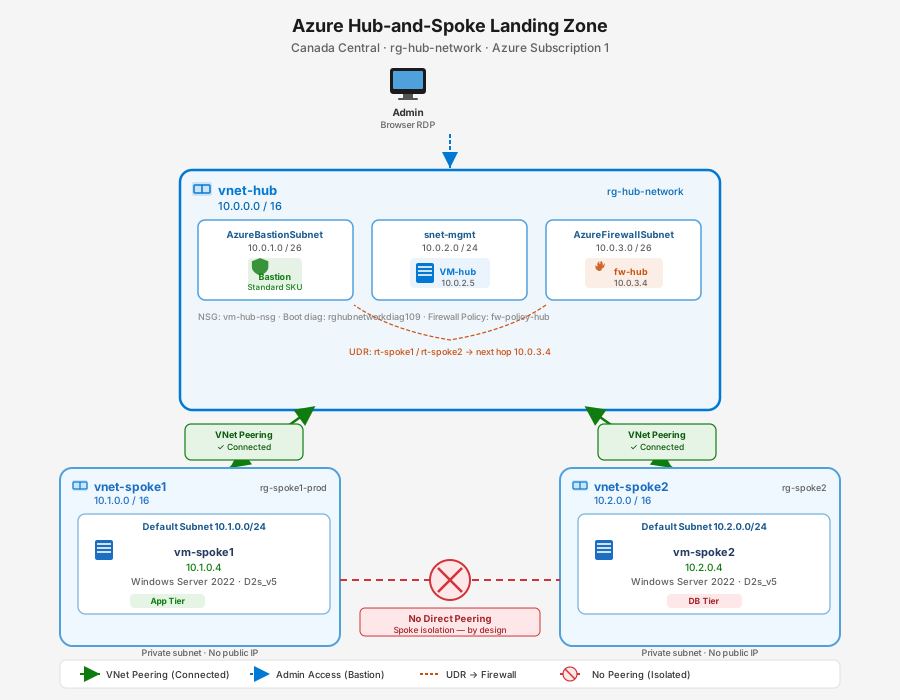
Network Segments
| VNet | Address Space | Role | Resource Group |
|---|---|---|---|
| vnet-hub | 10.0.0.0/16 | Shared services hub | rg-hub-network |
| vnet-spoke1 | 10.1.0.0/16 | Application tier | rg-spoke1-prod |
| vnet-spoke2 | 10.2.0.0/16 | Database tier | rg-spoke2 |
Hub Subnets
| Subnet | CIDR | Purpose |
|---|---|---|
| AzureBastionSubnet | 10.0.1.0/26 | Azure Bastion (Standard) |
| snet-mgmt | 10.0.2.0/24 | Management VMs |
| AzureFirewallSubnet | 10.0.3.0/26 | Azure Firewall (Standard) |
VNet Peering Matrix
| Pair | Hub-side link | Spoke-side link | State |
|---|---|---|---|
| Hub ↔ Spoke 1 | spoke-1-to-hub | hub-to-spoke-1 | Connected |
| Hub ↔ Spoke 2 | spoke2-hub | hub-spoke2 | Connected |
Environment
Compute
| Attribute | Value |
|---|---|
| VM SKU | Standard D2s_v5 (2 vCPU, 8 GiB) |
| OS | Windows Server 2022 Datacenter |
| Region | Canada Central |
| Subscription | Azure Free Trial ($200 / 30 days) |
VM Inventory
| VM | VNet / Subnet | Private IP | Public IP | Role |
|---|---|---|---|---|
| VM-hub | vnet-hub / snet-mgmt | 10.0.2.5 | None (Bastion) | Management |
| vm-spoke1 | vnet-spoke1 / default | 10.1.0.4 | None | Application tier |
| vm-spoke2 | vnet-spoke2 / default | 10.2.0.4 | None | Database tier |
Shared Services (Hub)
| Resource | Type | Details |
|---|---|---|
| vnet-hub-bastion | Bastion Host | Standard SKU, serves all spokes via peering |
| fw-hub | Azure Firewall | Standard SKU, private IP 10.0.3.4 |
| fw-policy-hub | Firewall Policy | Network + application rule collections |
Implementation
Phase 1 — Network Foundation
- Created 3 VNets with non-overlapping /16 address spaces
- Added hub subnets: AzureBastionSubnet (/26), snet-mgmt (/24), AzureFirewallSubnet (/26)
- Deployed Azure Bastion (Standard) in the hub — enables browser-based RDP to all VMs including spokes over peering
- Created VNet peering (hub ↔ spoke1, hub ↔ spoke2) with forwarded traffic enabled
- Deployed 3 Windows Server 2022 VMs, one per VNet
- Enabled ICMP on all VMs for connectivity testing:
Critical
Windows Firewall blocks ICMP by default. Skipping this step causes false-negative ping results that look like broken peering.
Phase 2 — Secured Hub (Azure Firewall + UDRs)
- Deployed Azure Firewall Standard in AzureFirewallSubnet (private IP: 10.0.3.4)
- Created User-Defined Route tables on each spoke subnet pointing cross-spoke traffic to the firewall:
| Route Table | Destination | Next Hop |
|---|---|---|
| rt-spoke1 | 10.2.0.0/16 | 10.0.3.4 (Virtual Appliance) |
| rt-spoke2 | 10.1.0.0/16 | 10.0.3.4 (Virtual Appliance) |
- Configured firewall policy with least-privilege network rules:
| Rule | Source | Destination | Protocol | Port | Action |
|---|---|---|---|---|---|
| app-to-db-sql | 10.1.0.0/16 | 10.2.0.0/16 | TCP | 1433 | Allow |
Key Concept
UDR creates the path; the firewall rule controls what's allowed. Deploying a firewall without routing does nothing — traffic never reaches it.
Phase 3 — Private PaaS (Planned)
- Azure SQL Database with public access disabled
- Private Endpoint in vnet-spoke2 giving the database a private IP
- Private DNS Zone (
privatelink.database.windows.net) linked to all VNets for automatic private name resolution - Validation: app tier connects to SQL privately through the firewall; public internet access to SQL fails
Troubleshooting
Bastion Connection Dropping in Browser
Symptom: Bastion threw "network connection appears unstable" and disconnected immediately.
Root Cause: Browser ad-blocker/privacy extension killed the persistent WebSocket connection.
Resolution: Opened Azure portal in Incognito/InPrivate window — connected immediately. Permanent fix: whitelist portal.azure.com and *.bastion.azure.com.
VM Size Not Available — NotAvailableForSubscription
Symptom: No B-series (free-tier) VMs appeared in the size picker for Canada Central.
Root Cause: Two Basics-tab filters hiding cheap SKUs simultaneously — Availability Zone = Zone 1 and Security type = Trusted launch.
Resolution: Set Availability options to No infrastructure redundancy required and Security type to Standard.
Diagnostic tip
When Azure says a size is unavailable, check whether your filters are hiding it before assuming the region lacks capacity.
Spoke-to-Spoke Ping Succeeds When It Shouldn't
Symptom: After adding a firewall, spoke-to-spoke ping unexpectedly works without an explicit allow rule.
Root Cause: Gateway transit or a UDR misconfiguration is bridging the spokes, or an ICMP allow rule was left from testing.
Resolution: Remove any temporary ICMP allow rules. Verify no gateway transit is enabled on peering settings.
Validation
Phase 1 — Peering & Isolation
| Test | From | To | Expected | Result |
|---|---|---|---|---|
| T1 Hub → Spoke1 | VM-hub | 10.1.0.4 | Success | ✅ Passed |
| T2 Hub → Spoke2 | VM-hub | 10.2.0.4 | Success | ✅ Passed |
| T3 Spoke1 → Hub | vm-spoke1 | 10.0.2.5 | Success | ✅ Passed |
| T4 Spoke2 → Hub | vm-spoke2 | 10.0.2.5 | Success | ✅ Passed |
| T5 Spoke1 → Spoke2 | vm-spoke1 | 10.2.0.4 | Timeout | ✅ Passed |
| T6 Spoke2 → Spoke1 | vm-spoke2 | 10.1.0.4 | Timeout | ✅ Passed |
Phase 2 — Firewall Control
| Test | Condition | Expected | Result |
|---|---|---|---|
| A1 Routes set, no allow rule | spoke1 → spoke2 | Timeout (default deny) | ✅ |
| A2 ICMP allow rule added | spoke1 → spoke2 | Success | ✅ |
| B1 Port 1433 (SQL) | spoke1 → spoke2 | Allowed | ✅ |
| B2 Port 3389 (RDP) | spoke1 → spoke2 | Blocked | ✅ |
Key Learnings
- Designing and deploying Azure hub-and-spoke aligned with Cloud Adoption Framework landing zone patterns
- Configuring VNet peering with forwarded traffic and gateway transit controls
- Deploying and managing Azure Bastion (Standard) for centralized, zero-public-IP access across peered VNets
- Implementing Azure Firewall with policy-based rule collections for inter-spoke traffic control
- Creating User-Defined Routes to force traffic through a centralized inspection point
- Understanding the distinction between NSG (5-tuple filtering) and Azure Firewall (FQDN, application-layer, IDS/IPS)
- Private Endpoints and Private DNS Zones for securing PaaS services without public exposure
- Managing Azure free-trial cost constraints — budget alerts, SKU selection, teardown discipline
Core principle: Hub-and-spoke centralizes shared, expensive, security-sensitive services in a single hub. Spokes are isolated by default; cross-segment traffic routes through the hub firewall via UDRs. The routing creates the path; the firewall rule controls the permission.
Tools & Technologies
| Category | Technology |
|---|---|
| Cloud Platform | Microsoft Azure |
| Networking | VNet, VNet Peering, UDR, NSG |
| Firewall | Azure Firewall (Standard) |
| Secure Access | Azure Bastion (Standard SKU) |
| Compute | Azure VMs (D2s_v5, Windows Server 2022) |
| PaaS Security | Private Endpoints, Private DNS Zones |
| Framework | Microsoft Cloud Adoption Framework (Landing Zones) |
| Diagnostics | ping, Test-NetConnection, Azure Network Watcher |
| Cost Management | Azure Cost Management + Budget Alerts |