VMware & Hyper-V to Azure Migration Lab
A migration is not just moving virtual disks. It is moving a working service—with its dependencies, security, recovery plan, and business expectations intact.
Project replica
This lab is an anonymized replica of a recent migration project I worked on, recreated to document the architecture, planning, and migration approach without exposing confidential information. Server names, quantities, and environment-specific details have been sanitized for this portfolio.
Executive summary
This project models the migration of a small mixed-hypervisor environment from an on-premises datacenter to Azure. The source estate contains VMware vSphere and Microsoft Hyper-V workloads supporting a web application, business database, file services, and management tools.
The proposed solution uses Azure Migrate: Discovery and Assessment to build the inventory, collect performance data, identify dependencies, and recommend Azure VM sizes. Azure Migrate: Migration and Modernization provides replication, test migration, and final cutover paths for both hypervisors.
| Project type | Anonymized project replica and migration runbook |
| Source platforms | VMware vSphere and Microsoft Hyper-V |
| Target | Azure Virtual Machines |
| Migration tool | Azure Migrate |
| Migration style | Rehost first, optimize after stabilization |
| Execution model | Dependency-aware migration waves |
| Validation | Test VNet, application checks, monitoring, and business sign-off |
| Safety controls | Change freeze, rollback window, backups, and source retention |
Project background
The replicated environment represents six virtual machines distributed across VMware and Hyper-V. The migration was driven by aging infrastructure, upcoming hardware-refresh costs, and a need to improve disaster-recovery capability in Azure.
| Workload | Source | Operating system | Role | Migration priority |
|---|---|---|---|---|
BOREAL-WEB01 |
VMware | Windows Server | Public web tier | High |
BOREAL-APP01 |
VMware | Windows Server | Application services | High |
BOREAL-SQL01 |
VMware | Windows Server | SQL database | Critical |
BOREAL-FS01 |
Hyper-V | Windows Server | Department file shares | Medium |
BOREAL-MGMT01 |
Hyper-V | Windows Server | Management tools | Medium |
BOREAL-LNX01 |
Hyper-V | Ubuntu Server | Internal utility service | Low |
Migration objectives
- Discover the estate without relying on an incomplete spreadsheet inventory.
- Capture CPU, memory, disk, network, and dependency data before sizing Azure resources.
- Preserve application communication paths across migration waves.
- Prove boot, connectivity, security, and application function in an isolated test network.
- Keep a practical rollback option until the migrated service is accepted.
- Establish Azure Backup, monitoring, patching, and ownership after cutover.
Proposed architecture
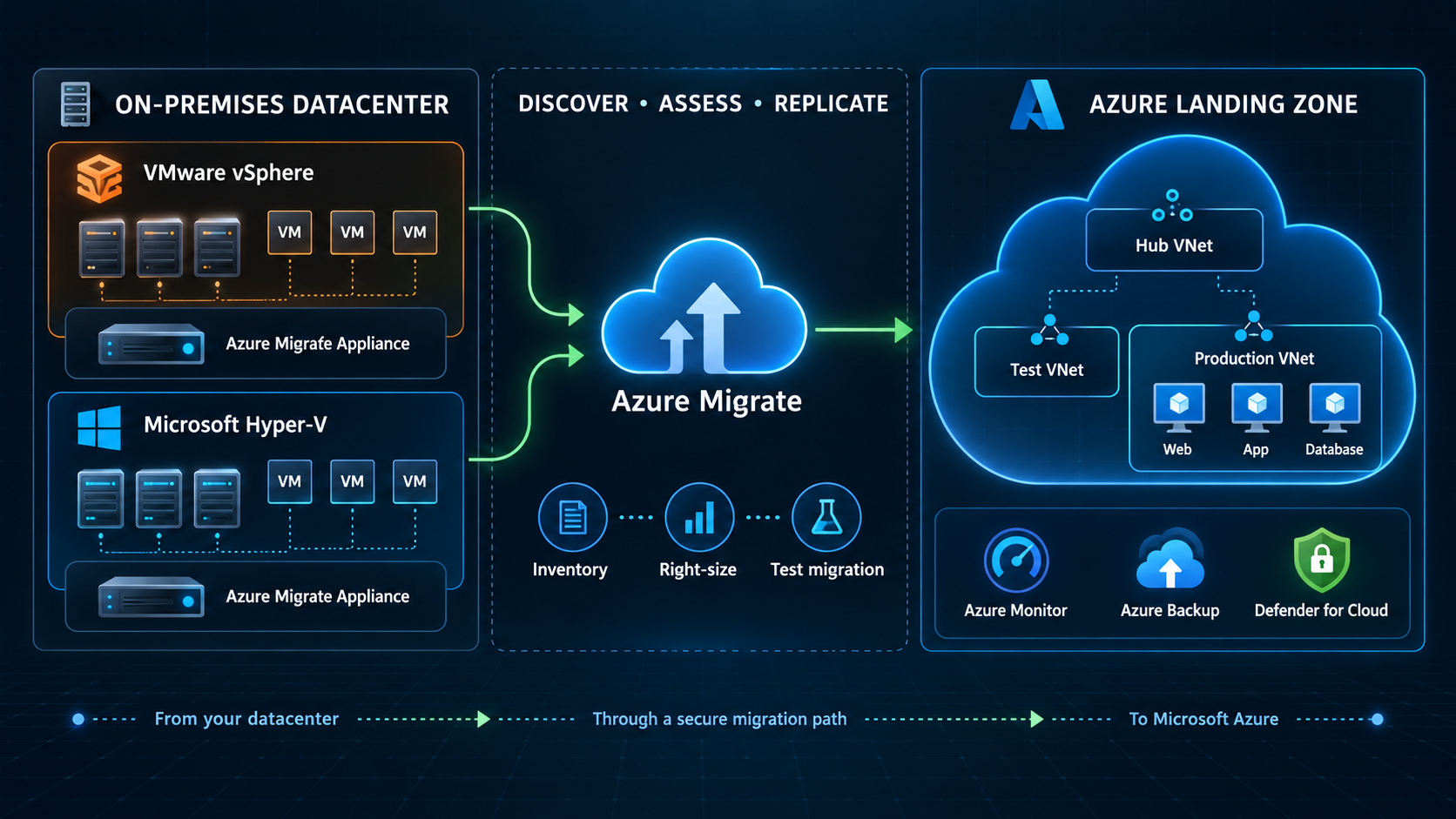
Migration architecture showing the two source-platform discovery paths, Azure Migrate workflow, isolated testing, production workload placement, and post-migration operational services.
Why two appliance paths?
VMware and Hyper-V use platform-specific discovery and replication components. They can feed the same Azure Migrate project, but their prerequisites and source-side setup are validated separately.
Migration strategy
The design follows seven controlled phases rather than treating migration as a single cutover event.
1. Prepare the Azure landing zone
Before discovering workloads, establish the target subscription, resource groups, identity model, naming and tagging standards, hub-and-spoke networking, DNS, Network Security Groups, administrative access, monitoring, and backup policies.
Key decisions include:
- target Azure region and paired-region considerations;
- IP addressing that does not overlap with the source network;
- site-to-site VPN or ExpressRoute connectivity;
- administrative access through Azure Bastion or another approved path;
- least-privilege roles for the migration team; and
- budget alerts and mandatory resource tags.
2. Discover VMware and Hyper-V
Deploy an Azure Migrate appliance for each source platform and register both with the Azure Migrate project.
For VMware, the appliance connects to vCenter with a dedicated read-only discovery account. For Hyper-V, the appliance discovers the hosts or cluster using an account with the required permissions. Discovery collects configuration and performance metadata without immediately changing the VMs.
[ ] Verify outbound HTTPS connectivity to Azure
[ ] Create least-privilege discovery accounts
[ ] Register both appliances with Azure Migrate
[ ] Confirm all in-scope VMs are discovered
[ ] Enable software inventory and dependency analysis where appropriate
[ ] Allow enough observation time to capture representative performance
3. Assess and right-size
Create assessments for the VMware and Hyper-V groups using the same business assumptions: target region, pricing model, storage redundancy, comfort factor, and performance history.
The assessment is used to review:
- Azure readiness and unsupported configurations;
- recommended VM size and managed disk type;
- estimated monthly compute and storage cost;
- boot type and operating-system compatibility;
- CPU and memory utilization rather than allocated capacity alone; and
- remediation required before replication.
Assessment output is a recommendation
A sizing recommendation is reviewed against workload behavior, licensing, seasonal demand, and business criticality. A migration engineer should not accept every recommendation without context.
4. Map dependencies and build waves
Dependency data is used to avoid moving a front end while leaving a required database unreachable. The replicated environment is divided into the following waves:
| Wave | Workloads | Reason |
|---|---|---|
| Pilot | BOREAL-LNX01 |
Low-risk validation of connectivity and operating procedures |
| Wave 1 | BOREAL-MGMT01 |
Establish management capability in Azure |
| Wave 2 | BOREAL-WEB01, BOREAL-APP01, BOREAL-SQL01 |
Move the application stack as a coordinated dependency group |
| Wave 3 | BOREAL-FS01 |
Migrate after access, capacity, and data-validation planning |
Each wave receives an owner, maintenance window, communications plan, test script, success criteria, and rollback decision point.
5. Replicate by source platform
VMware path
Use the recommended agentless path where the environment meets Azure Migrate requirements. The appliance coordinates replication without installing an agent inside every guest. Target settings—subscription, resource group, VNet, subnet, VM size, disks, and availability options—are reviewed before replication begins.
Hyper-V path
Install and register the required replication provider on the Hyper-V hosts or cluster nodes. Map each source VM to its Azure target settings, then monitor initial and delta replication before testing.
Keep source and target configuration documented
A migration mapping sheet should record the source VM, owner, application, dependencies, target size, subnet, private IP requirement, disk layout, backup policy, migration wave, and validation owner.
6. Test migration
Every workload is test-migrated into an isolated Azure VNet before production cutover. The source VM stays online and replication continues during the test.
The validation plan checks:
Infrastructure
  - Azure VM boots without errors
  - Expected disks are online
  - Correct VM size, subnet, NSG, and DNS are applied
  - Time synchronization and routes are correct

Operating system
  - No critical event-log or service failures
  - Azure VM Agent is healthy
  - Required local firewall rules are active

Application
  - Web and application services start
  - Application-to-database connectivity succeeds
  - Authentication and scheduled tasks work
  - Business owner completes the agreed smoke test

Operations
  - Azure Monitor receives telemetry
  - Backup policy is assigned and tested
  - Administrative access follows the approved path
Test resources are removed after results and remediation actions are documented.
DNS migration and cutover plan
DNS changes are treated as part of the migration runbook rather than as an afterthought. Before each migration wave, the team inventories the workload's forward, reverse, alias, and service records; confirms which DNS team or provider owns each zone; and identifies applications that use hard-coded IP addresses instead of hostnames.
For records that will change during cutover, the time to live (TTL) is reduced—typically 24 to 48 hours before the maintenance window—to limit how long clients cache the old address. The existing value and target value are recorded in the migration mapping sheet so the change can be reversed quickly.
During cutover:
- Keep the existing DNS records pointed at the source environment while final replication and Azure VM startup complete.
- Validate the target VM through an approved temporary record, isolated test-zone entry, or local hosts-file override.
- Update the required internal DNS, Azure Private DNS, and public DNS records to the Azure endpoint only after infrastructure checks pass.
- Flush resolver caches where operationally appropriate, then verify name resolution from representative client networks.
- Test the application by hostname—not only by IP address—including authentication, certificates, database connectivity, and monitoring.
- If validation fails, restore the documented source records and restart the source services as part of rollback.
- After the stabilization window, restore the normal TTL and remove temporary validation records.
DNS rollback is time-sensitive
A low TTL reduces caching but does not guarantee that every recursive resolver will expire a record immediately. The cutover plan therefore keeps the source environment recoverable and allows time for DNS propagation before declaring the migration complete.
7. Cut over and stabilize
The production runbook uses a defined decision timeline:
sequenceDiagram
    participant IT as Migration team
    participant SRC as Source VM
    participant AM as Azure Migrate
    participant AZ as Azure VM
    participant BO as Business owner

    IT->>BO: Confirm maintenance window
    IT->>SRC: Stop application writes and services
    IT->>AM: Trigger final migration
    AM->>AZ: Apply latest replicated changes
    IT->>AZ: Start and validate infrastructure
    IT->>IT: Update DNS records to Azure targets
    IT->>BO: Request application validation
    alt Validation passes
        BO-->>IT: Approve production service
        IT->>IT: Confirm monitoring and backup, restore normal DNS TTL, and update documentation
    else Validation fails
        BO-->>IT: Reject cutover
        IT->>IT: Restore source DNS records
        IT->>SRC: Restart source services and execute rollback plan
    end
After sign-off, replication is completed and temporary migration resources are cleaned up. The source VM is retained in a powered-off state for the approved rollback period before decommissioning.
Rollback approach
A rollback is a planned branch of the runbook, not an improvised response.
Rollback is considered when:
- the Azure VM does not boot or remain stable;
- a critical dependency cannot be restored inside the window;
- application validation fails;
- performance is materially below the agreed baseline; or
- security or data-integrity checks fail.
The rollback procedure keeps source systems unchanged until cutover, records the time at which application writes stop, restores source services when the decision is made, reverses temporary DNS or routing changes, and communicates service status to stakeholders.
Data consistency matters
Once users or applications write new data to the Azure VM, falling back to the source can create data divergence. The runbook therefore defines who can approve rollback, how writes are controlled, and how data is reconciled.
Post-migration validation
Migration is complete only after the workload is operationally owned in Azure.
- Enable Azure Backup and verify the first recovery point.
- Connect the VM to Azure Monitor and Log Analytics.
- Review Defender for Cloud recommendations.
- Confirm patching responsibility and maintenance windows.
- Validate NSGs and remove temporary migration access.
- Compare performance with the pre-migration baseline.
- Update CMDB, diagrams, support documentation, and ownership records.
- Review costs after a representative operating period and resize when justified.
Risks and mitigations
| Risk | Mitigation |
|---|---|
| Incomplete inventory | Appliance-based discovery plus owner review |
| Incorrect Azure sizing | Performance-based assessment and post-cutover review |
| Hidden application dependencies | Dependency analysis and application-owner workshops |
| Network overlap or DNS failure | Landing-zone validation, DNS inventory, reduced TTL, isolated testing, and documented record rollback |
| Cutover exceeds the window | Pilot wave, measured replication, and go/no-go checkpoints |
| Unsupported guest configuration | Readiness assessment and remediation before replication |
| Data divergence during rollback | Application freeze and explicit data-reconciliation plan |
| Unexpected cloud cost | Tags, budgets, assessment estimates, and right-sizing review |
Project outcomes
Recreating the project produced a reusable and clearly documented migration approach:
- a discovery and assessment plan for both VMware and Hyper-V;
- a dependency-aware wave plan;
- separate replication procedures for each hypervisor;
- an isolated test-migration checklist;
- a cutover runbook with go/no-go and rollback points;
- a post-migration operational checklist; and
- clear explanations for migration decisions during technical interviews.
What I learned
Discovery comes before architecture
Target design depends on what actually exists: utilization, disk behavior, software, dependencies, ownership, and recovery needs. Guessing from allocated vCPU and memory can create unnecessary cost or performance risk.
VMware and Hyper-V converge in Azure—but take different source paths
Both platforms can be assessed in the same Azure Migrate project and moved to Azure VMs, while appliance deployment, permissions, and replication preparation remain platform-specific.
Test migration is the rehearsal
An isolated test proves more than whether a VM boots. It validates networking, DNS, security controls, application behavior, monitoring, backup, and the team's runbook before the maintenance window.
A successful cutover includes operations
A reachable Azure VM is not the finish line. Backup, monitoring, security, patching, documentation, cost ownership, and business acceptance determine whether the workload is truly ready.
Technology stack
| Technology | Role |
|---|---|
| Azure Migrate | Discovery, assessment, replication, testing, and migration workflow |
| VMware vSphere / vCenter | Source virtualization platform |
| Microsoft Hyper-V | Source virtualization platform |
| Azure Virtual Machines | Rehost target |
| Azure VNets and NSGs | Target connectivity and traffic control |
| Azure Bastion | Controlled administrative access |
| Azure Monitor / Log Analytics | Post-migration visibility |
| Azure Backup | Recovery protection after cutover |
| Defender for Cloud | Security posture review |
References
- Azure Migrate overview and support matrix
- VMware agentless migration with Azure Migrate
- VMware migration support matrix
- Hyper-V migration support matrix
- Azure Migrate appliance for Hyper-V
Discuss this migration project
For questions about this architecture or the migration runbook, email [email protected] and mention the “Azure migration project.”